
Publish a Rubric
Rubric Status
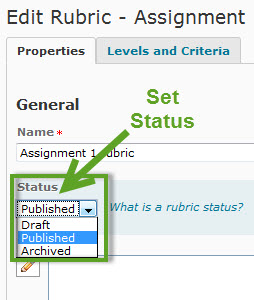
There are three types of status' which can be applied to a rubric:
- Draft - the rubric is still able to be edited and is not yet associated with an item.
- Published - the rubric has been published and associated with an item and cannot be edited.
- Archived - the rubric is not available for new associations yet still exists for previous associations.
Once the rubric has been created and is ready to be assigned to an item the rubric will need to be published. To publish a rubric, go to the rubric on the Properties tab. Use the pulldown in the Status field, next to the rubric to Publish, select Status, Published.