

Edit a Rubric
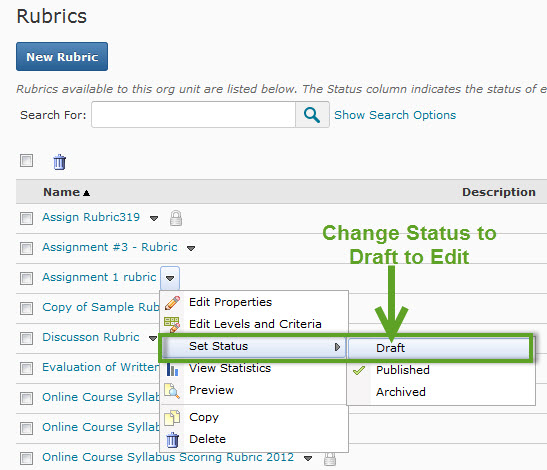
To edit a rubric it has to be in the Draft status. If the rubric has been published there will be "padlock" icon by the item, to edit a published item change the status to Draft by using the pulldown arrow next to the rubric, select Set Status, Draft.
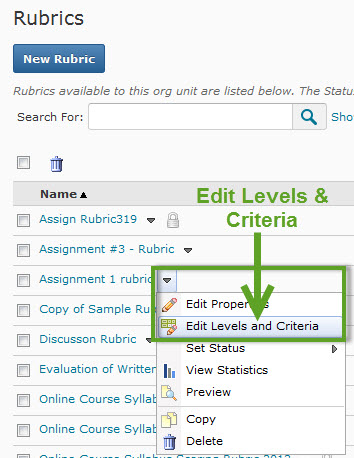
Rubrics in the Draft status can be edited by using the pulldown arrow and selecting Edit Properties, Edit Levels and Criteria.
Move to the next tab, Levels and Criteria. The levels and criteria can be edited by using the pulldown arrow next to the item.
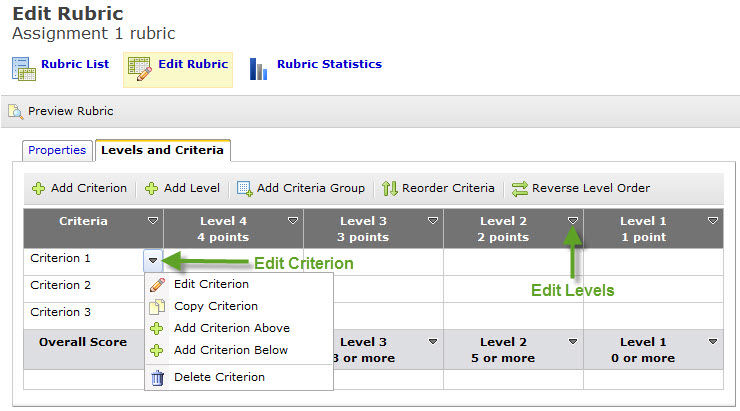
Continue editing or adding criteria and levels until the rubric is complete. You can preview the rubric by using the Preview link in the pulldown next to the title.
