
Assign a Rubric to a Dropbox
After a rubric has been created and published it can be assigned to an assignment or assessment. Note: assigning a rubric to a Discussion does not currently work.
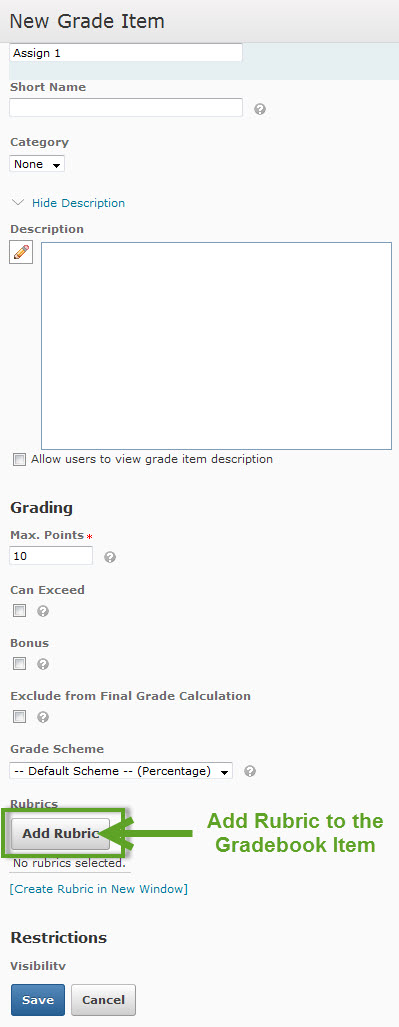
To add a rubric to an assignment in the Dropbox it needs to be added to the gradebook item and the dropbox item. Go to the dropbox folder and edit, or if you are creating a new assignment the rubric can be added then to the Grade Item and the Dropbox Folder. In the Properties tab use the New Grade Item to create a gradebook column, enter the title, Max Points, select Add Rubric button to add an existing rubric or Create Rubric in New Window to create a new one. Save.
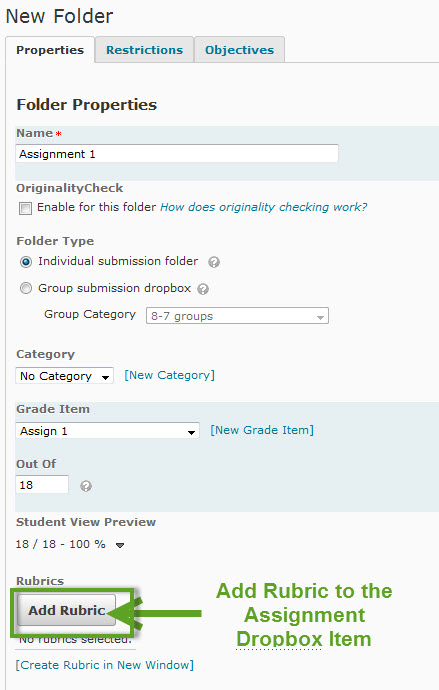
In the Folder Properties use the Add Rubric button to add an existing rubric or Create Rubric in New Window to create a new one. Enter the other information for the assignement. Save.